
Attending a trade show can be a very effective method of promoting your company and its products. And one of the most effective ways to optimize your trade show display and increase traffic to your booth is through the use of banner stands.

Balamani
Author
Choosing payroll software in India is about more than automation or pricing. The right solution should ensure accurate salary processing, statutory compliance and the flexibility to support business growth.
With evolving tax regulations, statutory deductions and state-specific requirements, payroll has become a critical business function. Instead of comparing feature lists, HR leaders should evaluate payroll software against practical compliance and operational checks. Here are nine essential checks to consider before making a decision.
Compliance should be the first evaluation criterion, not the last.
Indian payroll requires organisations to comply with several statutory obligations, including:
The challenge is not only performing these calculations but ensuring they remain accurate when regulations change.
Payroll software should therefore support:
Remember that software should simplify compliance, not require HR teams to manually monitor every legislative change.
Payroll mistakes are expensive.
An incorrect salary calculation affects employees immediately, while correcting errors often creates additional work for payroll, HR and finance teams.
Robust payroll software should include multiple validation mechanisms before salaries are processed.
Look for capabilities such as:
Rather than identifying mistakes after salary payments have been released, organisations should be able to detect anomalies before payroll is finalised.
Best practice
Enterprise organisations increasingly use multi-level payroll approvals involving HR, finance and business leaders before payroll is released. Software should support these governance processes instead of relying on manual spreadsheets.
Few organisations operate with a single compensation model.
As businesses expand, payroll becomes increasingly complex because different employee groups may receive:
Payroll software should allow HR teams to configure these components without requiring extensive technical intervention.
This flexibility becomes especially important when organisations introduce new compensation policies, acquire businesses or expand into new locations.
Rigid systems often force payroll administrators to perform manual adjustments outside the application, increasing both compliance and payroll risks.
Why flexibility matters
The best payroll management systems adapt to organisational policy, not the other way around.
As a result, HR leaders should evaluate configuration capabilities alongside statutory compliance rather than treating them as separate considerations.
For growing organisations, payroll complexity often increases before employee numbers do.
A company with 800 employees operating across six Indian states may face greater compliance challenges than a business with 2,000 employees in a single location. Different states have varying Professional Tax rules, Labour Welfare Fund requirements, minimum wage notifications and leave-related regulations. These differences can complicate salary processing if payroll rules are not configurable.
A payroll system should therefore support:
Questions to ask payroll vendors
Instead of asking, "Can your software support multiple states?", ask:
For organisations expanding into new regions, these capabilities reduce the need for manual workarounds and help maintain consistency across the business.
Payroll is often one of the few HR processes every employee interacts with every month.
An employee who cannot access payslips, download tax documents or understand salary deductions is more likely to raise support requests. Over time, this increases the administrative burden on HR teams.
Modern payroll software should therefore include employee self-service capabilities that improve transparency and reduce routine queries.
Look for features such as:
Why this matters
A good employee payroll experience is not only about convenience. It builds confidence that salaries are being calculated correctly and gives employees greater visibility into how their compensation is structured.
For HR teams, fewer payroll-related enquiries also create more time for strategic work.
Payroll rarely operates in isolation.
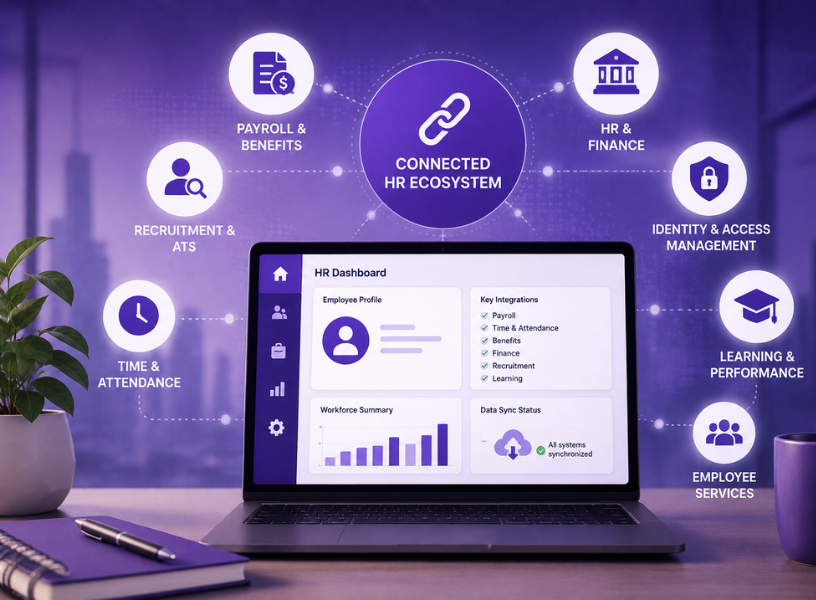
Accurate payroll depends on reliable data flowing from multiple business systems, including:
When these systems are disconnected, HR teams often spend days exporting spreadsheets, reconciling data and correcting errors before every payroll cycle.
A well-integrated payroll platform should automatically synchronise:
Integration checklist
Ask prospective payroll vendors:
Strong integrations reduce manual effort while improving payroll accuracy.
Payroll requirements rarely remain static.
Over the next three to five years, organisations may:
Software that performs well for 300 employees may become difficult to manage at 5,000 employees if scalability was not considered during selection.
Evaluate scalability across four dimensions
Scalability is not simply about handling larger employee numbers. It is about supporting greater operational complexity without increasing manual administration.
Payroll contains some of the organisation's most sensitive information.
Employee records typically include:
Protecting this information is essential for maintaining employee trust and meeting organisational governance requirements.
When evaluating payroll software, HR and IT teams should jointly assess:
Don't assess security in isolation
Security should not be left solely to the IT department. Payroll leaders understand who needs access to payroll data and how payroll processes operate. Collaboration between HR, finance and IT leads to more balanced decisions.
The quality of payroll software is only one part of a successful implementation.
Implementation methodology, support responsiveness and payroll expertise often determine whether a project succeeds.
During vendor evaluation, ask about:
Payroll data should do more than support salary payments. It should help HR and finance make informed workforce decisions.
Look for payroll software that offers:
Questions to ask payroll vendors
Strong reporting capabilities enable organisations to move from reactive payroll administration to data-driven workforce planning.
Not every payroll cycle follows the same pattern. Salary revisions, bonuses, arrears, final settlements and corrections often need to be processed outside the regular payroll run.
A robust payroll solution should handle these scenarios without creating manual workarounds.
Evaluate whether the software supports:
Software that efficiently manages payroll exceptions reduces administrative effort and ensures employees are paid accurately, even in complex situations.
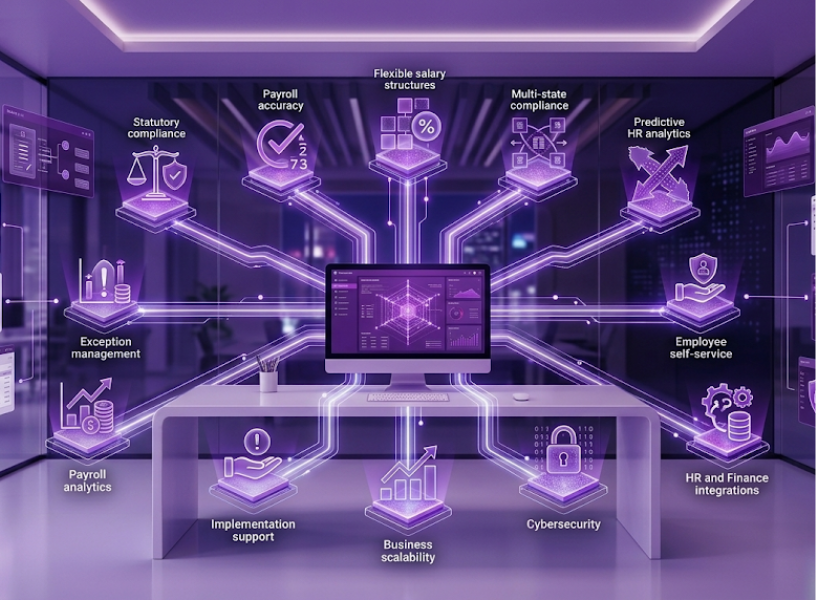
Selecting the right payroll software is about more than automating salary processing. It should help your organisation maintain compliance, improve payroll accuracy and scale as your workforce grows. By evaluating solutions against these nine practical checks, HR leaders can make informed decisions based on long-term business needs rather than feature lists. A structured, compliance-first approach will help you choose software that supports efficient payroll management and delivers a better experience for both HR teams and employees.
1. What should HR leaders prioritise when choosing payroll software?
Focus on statutory compliance, payroll accuracy, scalability, integration capabilities and data security before comparing features or pricing.
2. How is payroll software different from HR software?
HR software manages employee records and HR processes, while payroll software calculates salaries, statutory deductions and manages employee payroll.
3. Why is compliance important in payroll management?
Automated compliance helps organisations stay current with statutory requirements, reduce payroll errors and minimise regulatory risks.
4. What integrations should payroll software support?
It should integrate with HR software, attendance, leave, finance and banking systems to streamline salary processing and reduce manual work.
5. How can organisations compare payroll vendors objectively?
Use a scorecard that evaluates payroll vendors on compliance, flexibility, integration, scalability, security and implementation support rather than feature lists alone.

Many people would say that it is absolute madness to keep on doing the same thing, time after time, expecting to get a different result or for something different to happen.
Hoover Dam and the Grand Canyon: Book yourself a seat on any of the many sightseeing tours available and go and watch the architectural marvel that is Hoover Dam built over the Grand canyon which is also a grand sight to see by itself. Black Canyon is another must see as is Lake Mead which is so beautiful just because it is a body of water all surrounded by desert-like nature. Colorado River:
While looking at the Dam and Canyon is from above, to see the true beauty of the river, you have to go down. The Colorado river is excellent for river-rafting and water sports, but you do not have to take part if it is not your thing. Instead just sit back and enjoy another of nature’s marvels.


.webp)
Who can not resist going to one of the old towns like those in the Western gun slinging movies? Your destination needs to be Old Nevada. There you can delight in an old western town right in the middle of Red Rock Canyon. They host western shootouts too so come prepared, partner! I could go on and on about other attractions like the theme park in Circus Circus, the Gilcrease Nature Sanctuary, the Henderson Bird Viewing Preserve and Mt. Charleston but I think you get the picture. In Las Vegas and hate gambling? Do not despair. Just go out and have some clean un-gambling fun.
Choosing payroll software in India is about more than automation or pricing. The right solution should ensure accurate salary processing, statutory compliance and the flexibility to support business growth.
With evolving tax regulations, statutory deductions and state-specific requirements, payroll has become a critical business function. Instead of comparing feature lists, HR leaders should evaluate payroll software against practical compliance and operational checks. Here are nine essential checks to consider before making a decision.
Compliance should be the first evaluation criterion, not the last.
Indian payroll requires organisations to comply with several statutory obligations, including:
The challenge is not only performing these calculations but ensuring they remain accurate when regulations change.
Payroll software should therefore support:
Remember that software should simplify compliance, not require HR teams to manually monitor every legislative change.
Payroll mistakes are expensive.
An incorrect salary calculation affects employees immediately, while correcting errors often creates additional work for payroll, HR and finance teams.
Robust payroll software should include multiple validation mechanisms before salaries are processed.
Look for capabilities such as:
Rather than identifying mistakes after salary payments have been released, organisations should be able to detect anomalies before payroll is finalised.
Best practice
Enterprise organisations increasingly use multi-level payroll approvals involving HR, finance and business leaders before payroll is released. Software should support these governance processes instead of relying on manual spreadsheets.
Few organisations operate with a single compensation model.
As businesses expand, payroll becomes increasingly complex because different employee groups may receive:
Payroll software should allow HR teams to configure these components without requiring extensive technical intervention.
This flexibility becomes especially important when organisations introduce new compensation policies, acquire businesses or expand into new locations.
Rigid systems often force payroll administrators to perform manual adjustments outside the application, increasing both compliance and payroll risks.
Why flexibility matters
The best payroll management systems adapt to organisational policy, not the other way around.
As a result, HR leaders should evaluate configuration capabilities alongside statutory compliance rather than treating them as separate considerations.
For growing organisations, payroll complexity often increases before employee numbers do.
A company with 800 employees operating across six Indian states may face greater compliance challenges than a business with 2,000 employees in a single location. Different states have varying Professional Tax rules, Labour Welfare Fund requirements, minimum wage notifications and leave-related regulations. These differences can complicate salary processing if payroll rules are not configurable.
A payroll system should therefore support:
Questions to ask payroll vendors
Instead of asking, "Can your software support multiple states?", ask:
For organisations expanding into new regions, these capabilities reduce the need for manual workarounds and help maintain consistency across the business.
Payroll is often one of the few HR processes every employee interacts with every month.
An employee who cannot access payslips, download tax documents or understand salary deductions is more likely to raise support requests. Over time, this increases the administrative burden on HR teams.
Modern payroll software should therefore include employee self-service capabilities that improve transparency and reduce routine queries.
Look for features such as:
Why this matters
A good employee payroll experience is not only about convenience. It builds confidence that salaries are being calculated correctly and gives employees greater visibility into how their compensation is structured.
For HR teams, fewer payroll-related enquiries also create more time for strategic work.
Payroll rarely operates in isolation.
Accurate payroll depends on reliable data flowing from multiple business systems, including:
When these systems are disconnected, HR teams often spend days exporting spreadsheets, reconciling data and correcting errors before every payroll cycle.
A well-integrated payroll platform should automatically synchronise:
Integration checklist
Ask prospective payroll vendors:
Strong integrations reduce manual effort while improving payroll accuracy.
Payroll requirements rarely remain static.
Over the next three to five years, organisations may:
Software that performs well for 300 employees may become difficult to manage at 5,000 employees if scalability was not considered during selection.
Evaluate scalability across four dimensions
Scalability is not simply about handling larger employee numbers. It is about supporting greater operational complexity without increasing manual administration.
Payroll contains some of the organisation's most sensitive information.
Employee records typically include:
Protecting this information is essential for maintaining employee trust and meeting organisational governance requirements.
When evaluating payroll software, HR and IT teams should jointly assess:
Don't assess security in isolation
Security should not be left solely to the IT department. Payroll leaders understand who needs access to payroll data and how payroll processes operate. Collaboration between HR, finance and IT leads to more balanced decisions.
The quality of payroll software is only one part of a successful implementation.
Implementation methodology, support responsiveness and payroll expertise often determine whether a project succeeds.
During vendor evaluation, ask about:
Payroll data should do more than support salary payments. It should help HR and finance make informed workforce decisions.
Look for payroll software that offers:
Questions to ask payroll vendors
Strong reporting capabilities enable organisations to move from reactive payroll administration to data-driven workforce planning.
Not every payroll cycle follows the same pattern. Salary revisions, bonuses, arrears, final settlements and corrections often need to be processed outside the regular payroll run.
A robust payroll solution should handle these scenarios without creating manual workarounds.
Evaluate whether the software supports:
Software that efficiently manages payroll exceptions reduces administrative effort and ensures employees are paid accurately, even in complex situations.
Selecting the right payroll software is about more than automating salary processing. It should help your organisation maintain compliance, improve payroll accuracy and scale as your workforce grows. By evaluating solutions against these nine practical checks, HR leaders can make informed decisions based on long-term business needs rather than feature lists. A structured, compliance-first approach will help you choose software that supports efficient payroll management and delivers a better experience for both HR teams and employees.
1. What should HR leaders prioritise when choosing payroll software?
Focus on statutory compliance, payroll accuracy, scalability, integration capabilities and data security before comparing features or pricing.
2. How is payroll software different from HR software?
HR software manages employee records and HR processes, while payroll software calculates salaries, statutory deductions and manages employee payroll.
3. Why is compliance important in payroll management?
Automated compliance helps organisations stay current with statutory requirements, reduce payroll errors and minimise regulatory risks.
4. What integrations should payroll software support?
It should integrate with HR software, attendance, leave, finance and banking systems to streamline salary processing and reduce manual work.
5. How can organisations compare payroll vendors objectively?
Use a scorecard that evaluates payroll vendors on compliance, flexibility, integration, scalability, security and implementation support rather than feature lists alone.


.webp)


.webp)

Passionately focused on people and fostering relationships for over 25 Years