
Attending a trade show can be a very effective method of promoting your company and its products. And one of the most effective ways to optimize your trade show display and increase traffic to your booth is through the use of banner stands.

Balamani
Author
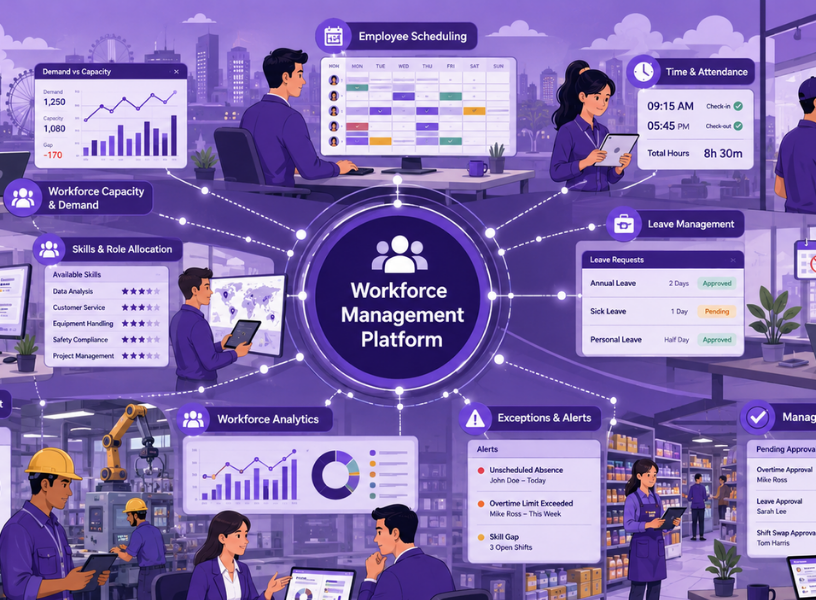
Managing a large workforce is no longer just about maintaining employee records. Enterprise HR teams increasingly need to answer operational questions: How many people are needed? When should they work? Do we have the right skills available? Are actual working hours matching the plan? And where are labour costs or workforce risks emerging?
These questions are particularly important for organisations that manage multiple countries, frontline workforces, different employment arrangements and varying levels of digital maturity.
The case for workforce management software is therefore broader than replacing spreadsheets. The real opportunity is to digitise the workforce decisions that connect demand, capacity, scheduling, working time, skills and labour cost.
Here are 10 workforce management tasks enterprise HR should consider digitising in 2026.
The question: How much workforce capacity will the business need, and how much is available?
Demand and capacity planning should be treated as one connected process. HR and operations can compare expected workload with available headcount, working hours, skills and locations to identify potential gaps or surpluses.
Scenario modelling can then be built into this process: What happens if demand increases, staffing falls, or certain skills become harder to source?
This is more useful than maintaining a static headcount plan because it connects workforce numbers to actual operational requirements.
The question: Who should work, where and when?
Creating schedules manually becomes increasingly difficult when managers must consider availability, skills, leave, shift patterns, coverage requirements and local policies.
Employee scheduling software can help automate schedule creation and identify coverage gaps while giving managers greater visibility into planned workforce deployment.
For multi-country organisations, scheduling should allow local working patterns and rules to be configured rather than assuming every market operates identically.
The question: Who actually worked, and for how long?
Digitising time and attendance creates a reliable record of actual working time rather than relying on disconnected timesheets or manual records.
The process can cover clock-ins and clock-outs, timesheets, attendance exceptions, late starts, early departures and actual hours compared with scheduled hours.
Accurate working-time data can then support payroll, overtime management and workforce reporting.
The question: Who will be unavailable, and what does that mean for workforce coverage?
Leave should not be treated only as an HR administration process. In frontline or shift-based environments, absence directly affects workforce capacity.
Digitised absence management can connect leave information with schedules and staffing requirements, helping managers identify potential coverage problems earlier.
This can be particularly useful for organisations operating across locations where different leave policies and workforce patterns need to coexist.
The question: Where and why is labour spending increasing?
Overtime management goes beyond recording extra hours. HRs need to understand where overtime is occurring, how much it costs and what is driving it.
Labour management software can connect scheduled hours, actual hours, overtime and labour budgets to reveal recurring patterns.
For example, persistent overtime may indicate a staffing gap, scheduling problem, unexpected demand or shortage of specific skills.
The objective is therefore not simply to reduce overtime. It is to understand whether additional labour is being used for the right reasons.
The question: Do we have the right skills available when and where they are needed?
Headcount alone does not tell HR whether a workforce can meet operational requirements.
Digital workforce processes can match employees to work based on skills, qualifications, certifications, availability and location.
This matters as skill requirements continue to change.The World Economic Forum estimates that 39% of workers' existing skill sets could be transformed or become outdated between 2025 and 2030, while skill gaps are cited by 63% of surveyed employers as a major barrier to business transformation.
For HR, this strengthens the connection between workforce planning, scheduling and skills development.
The question: Which routine workforce changes can employees manage themselves?
Employees and managers often need to make relatively simple changes: requesting a shift swap, indicating availability, submitting a scheduling request or checking upcoming shifts.
Digitising these interactions can reduce unnecessary administrative work for HR and managers while giving employees more visibility over their schedules.
The important consideration is governance. Self-services hould operate within defined rules and approval workflows rather than creating uncontrolled changes to workforce plans.
The question: What is happening across the workforce?
Enterprise HR teams often have workforce data spread across HR, payroll, scheduling and operational systems.
Workforce analytics can bring together measures such as attendance, absence, overtime, staffing levels, labour cost, schedule adherence and skills coverage.
The value comes from seeing relationships between these measures. A rise in overtime, for instance, may look different when viewed alongside vacancies, absence and skills availability.
For regional organisations, dashboards should also allow leaders to examine country and workforce-segment differences rather than relying only on regional averages.
The question: Where does workforce activity differ from the plan?
Not every workforce event needs human intervention. The challenge is identifying the exceptions that do.
Examples include missed shifts, unexpected overtime, staffing gaps, unapproved changes or significant differences between scheduled and actual hours.
Digitising exception management allows managers to focus on situations requiring a decision rather than manually reviewing every workforce record.
This is an important shift from simply collecting workforce data to actively managing operational deviations.
The question: Can managers make routine workforce decisions quickly and consistently?
Managers are often responsible for approving overtime, leave, schedule changes, attendance corrections and other workforce transactions.
When these processes rely on email, spreadsheets or disconnected systems, HR can become a bottleneck.
Digitising manager workflows can provide structured approvals, clearer accountability and better auditability while reducing repetitive administrative work.
The goal is not to remove managers from workforce decisions. It is to give them the information and workflows needed to make those decisions efficiently.
The best starting point is not necessarily the task with the newest technology. It is the process where manual effort, operational impact and data fragmentation are highest.
HR leaders can assess each workflow against four questions:
· How much manual work does it require?
· What business or workforce problem does it create?
· Is reliable data already available?
· Does the problem become more complex across countries, locations or workforce groups?
For many organisations, scheduling, time and attendance and overtime are practical starting points because they generate data that can support other workforce processes.
Others may benefit from starting with demand and capacity planning, particularly where workforce shortages or fluctuating demand are creating operational pressure.
The priority should be to improve a connected workflow rather than digitise isolated activities simply because software is available.
When evaluating workforce management vendors, HR should look beyond feature counts.
Important considerations include:
· Integration: Can workforce data connect with HCM, payroll, finance and operational systems?
· Configurability: Can different countries, workforce groups and policies be supported?
· Mobile access: Can frontline employees and managers use relevant functions easily?
· Data quality: Can HR trust the underlying workforce information?
· Analytics: Can the system explain workforce patterns rather than simply report them?
· Scalability: Can it support additional locations and workforce segments?
· Governance: Are approvals, access controls and audit trails appropriate?
Technology should support the operating model, not substitute for one.
Enterprise HR should think about workforce digitisation as a connected operating system for workforce decisions, not a collection of separate software features.
The priority in 2026 is to connect demand and capacity, scheduling, actual working time, skills, labour cost and workforce exceptions so that HR and managers can act on better information.
The practical next step is simple: map the workforce processes that still depend on spreadsheets, email or manual reconciliation, then prioritise the workflows where better data and faster decisions would have the greatest operational impact.
Adrenalin’s workforce management capabilities bring these connected processes together, helping organisations manage workforce capacity, scheduling, time, attendance, leave, overtime and workforce visibility through a more integrated approach.
Frequently Asked Questions
1.What is workforce management software?
Workforce management software helps organisations plan, schedule, track and analyse employee capacity and working time. It can include forecasting, scheduling, time and attendance, absence, overtime, skills management and workforce analytics.
2.What workforce management tasks should enterprises digitise first?
Start with tasks that create the greatest operational impact and manual effort, such as workforce planning, scheduling, time and attendance, absence and overtime. Priorities should reflect the organisation's workforce structure and business needs.
3.How does workforce management software support multi-country HR?
It can provide common workforce data and reporting while allowing country-specific working patterns, policies and rules to be configured separately. This helps organisations balance regional consistency with local requirements.
4.Is workforce management software the same as employee scheduling software?
No. Employee scheduling software focuses mainly on creating and managing schedules. Workforce management software generally covers a broader set of processes, including planning, attendance, absence, labour costs, skills and workforce analytics.
5.How should HR measure workforce management success?
Measure operational outcomes such as scheduling effort, overtime, staffing gaps, absence coverage, labour-cost variance, payroll corrections and manager administration. Establish a baseline before implementation and track changes over time.

Many people would say that it is absolute madness to keep on doing the same thing, time after time, expecting to get a different result or for something different to happen.
Hoover Dam and the Grand Canyon: Book yourself a seat on any of the many sightseeing tours available and go and watch the architectural marvel that is Hoover Dam built over the Grand canyon which is also a grand sight to see by itself. Black Canyon is another must see as is Lake Mead which is so beautiful just because it is a body of water all surrounded by desert-like nature. Colorado River:
While looking at the Dam and Canyon is from above, to see the true beauty of the river, you have to go down. The Colorado river is excellent for river-rafting and water sports, but you do not have to take part if it is not your thing. Instead just sit back and enjoy another of nature’s marvels.


.webp)
Who can not resist going to one of the old towns like those in the Western gun slinging movies? Your destination needs to be Old Nevada. There you can delight in an old western town right in the middle of Red Rock Canyon. They host western shootouts too so come prepared, partner! I could go on and on about other attractions like the theme park in Circus Circus, the Gilcrease Nature Sanctuary, the Henderson Bird Viewing Preserve and Mt. Charleston but I think you get the picture. In Las Vegas and hate gambling? Do not despair. Just go out and have some clean un-gambling fun.
Managing a large workforce is no longer just about maintaining employee records. Enterprise HR teams increasingly need to answer operational questions: How many people are needed? When should they work? Do we have the right skills available? Are actual working hours matching the plan? And where are labour costs or workforce risks emerging?
These questions are particularly important for organisations that manage multiple countries, frontline workforces, different employment arrangements and varying levels of digital maturity.
The case for workforce management software is therefore broader than replacing spreadsheets. The real opportunity is to digitise the workforce decisions that connect demand, capacity, scheduling, working time, skills and labour cost.
Here are 10 workforce management tasks enterprise HR should consider digitising in 2026.
The question: How much workforce capacity will the business need, and how much is available?
Demand and capacity planning should be treated as one connected process. HR and operations can compare expected workload with available headcount, working hours, skills and locations to identify potential gaps or surpluses.
Scenario modelling can then be built into this process: What happens if demand increases, staffing falls, or certain skills become harder to source?
This is more useful than maintaining a static headcount plan because it connects workforce numbers to actual operational requirements.
The question: Who should work, where and when?
Creating schedules manually becomes increasingly difficult when managers must consider availability, skills, leave, shift patterns, coverage requirements and local policies.
Employee scheduling software can help automate schedule creation and identify coverage gaps while giving managers greater visibility into planned workforce deployment.
For multi-country organisations, scheduling should allow local working patterns and rules to be configured rather than assuming every market operates identically.
The question: Who actually worked, and for how long?
Digitising time and attendance creates a reliable record of actual working time rather than relying on disconnected timesheets or manual records.
The process can cover clock-ins and clock-outs, timesheets, attendance exceptions, late starts, early departures and actual hours compared with scheduled hours.
Accurate working-time data can then support payroll, overtime management and workforce reporting.
The question: Who will be unavailable, and what does that mean for workforce coverage?
Leave should not be treated only as an HR administration process. In frontline or shift-based environments, absence directly affects workforce capacity.
Digitised absence management can connect leave information with schedules and staffing requirements, helping managers identify potential coverage problems earlier.
This can be particularly useful for organisations operating across locations where different leave policies and workforce patterns need to coexist.
The question: Where and why is labour spending increasing?
Overtime management goes beyond recording extra hours. HRs need to understand where overtime is occurring, how much it costs and what is driving it.
Labour management software can connect scheduled hours, actual hours, overtime and labour budgets to reveal recurring patterns.
For example, persistent overtime may indicate a staffing gap, scheduling problem, unexpected demand or shortage of specific skills.
The objective is therefore not simply to reduce overtime. It is to understand whether additional labour is being used for the right reasons.
The question: Do we have the right skills available when and where they are needed?
Headcount alone does not tell HR whether a workforce can meet operational requirements.
Digital workforce processes can match employees to work based on skills, qualifications, certifications, availability and location.
This matters as skill requirements continue to change.The World Economic Forum estimates that 39% of workers' existing skill sets could be transformed or become outdated between 2025 and 2030, while skill gaps are cited by 63% of surveyed employers as a major barrier to business transformation.
For HR, this strengthens the connection between workforce planning, scheduling and skills development.
The question: Which routine workforce changes can employees manage themselves?
Employees and managers often need to make relatively simple changes: requesting a shift swap, indicating availability, submitting a scheduling request or checking upcoming shifts.
Digitising these interactions can reduce unnecessary administrative work for HR and managers while giving employees more visibility over their schedules.
The important consideration is governance. Self-services hould operate within defined rules and approval workflows rather than creating uncontrolled changes to workforce plans.
The question: What is happening across the workforce?
Enterprise HR teams often have workforce data spread across HR, payroll, scheduling and operational systems.
Workforce analytics can bring together measures such as attendance, absence, overtime, staffing levels, labour cost, schedule adherence and skills coverage.
The value comes from seeing relationships between these measures. A rise in overtime, for instance, may look different when viewed alongside vacancies, absence and skills availability.
For regional organisations, dashboards should also allow leaders to examine country and workforce-segment differences rather than relying only on regional averages.
The question: Where does workforce activity differ from the plan?
Not every workforce event needs human intervention. The challenge is identifying the exceptions that do.
Examples include missed shifts, unexpected overtime, staffing gaps, unapproved changes or significant differences between scheduled and actual hours.
Digitising exception management allows managers to focus on situations requiring a decision rather than manually reviewing every workforce record.
This is an important shift from simply collecting workforce data to actively managing operational deviations.
The question: Can managers make routine workforce decisions quickly and consistently?
Managers are often responsible for approving overtime, leave, schedule changes, attendance corrections and other workforce transactions.
When these processes rely on email, spreadsheets or disconnected systems, HR can become a bottleneck.
Digitising manager workflows can provide structured approvals, clearer accountability and better auditability while reducing repetitive administrative work.
The goal is not to remove managers from workforce decisions. It is to give them the information and workflows needed to make those decisions efficiently.
The best starting point is not necessarily the task with the newest technology. It is the process where manual effort, operational impact and data fragmentation are highest.
HR leaders can assess each workflow against four questions:
· How much manual work does it require?
· What business or workforce problem does it create?
· Is reliable data already available?
· Does the problem become more complex across countries, locations or workforce groups?
For many organisations, scheduling, time and attendance and overtime are practical starting points because they generate data that can support other workforce processes.
Others may benefit from starting with demand and capacity planning, particularly where workforce shortages or fluctuating demand are creating operational pressure.
The priority should be to improve a connected workflow rather than digitise isolated activities simply because software is available.
When evaluating workforce management vendors, HR should look beyond feature counts.
Important considerations include:
· Integration: Can workforce data connect with HCM, payroll, finance and operational systems?
· Configurability: Can different countries, workforce groups and policies be supported?
· Mobile access: Can frontline employees and managers use relevant functions easily?
· Data quality: Can HR trust the underlying workforce information?
· Analytics: Can the system explain workforce patterns rather than simply report them?
· Scalability: Can it support additional locations and workforce segments?
· Governance: Are approvals, access controls and audit trails appropriate?
Technology should support the operating model, not substitute for one.
Enterprise HR should think about workforce digitisation as a connected operating system for workforce decisions, not a collection of separate software features.
The priority in 2026 is to connect demand and capacity, scheduling, actual working time, skills, labour cost and workforce exceptions so that HR and managers can act on better information.
The practical next step is simple: map the workforce processes that still depend on spreadsheets, email or manual reconciliation, then prioritise the workflows where better data and faster decisions would have the greatest operational impact.
Adrenalin’s workforce management capabilities bring these connected processes together, helping organisations manage workforce capacity, scheduling, time, attendance, leave, overtime and workforce visibility through a more integrated approach.
Frequently Asked Questions
1.What is workforce management software?
Workforce management software helps organisations plan, schedule, track and analyse employee capacity and working time. It can include forecasting, scheduling, time and attendance, absence, overtime, skills management and workforce analytics.
2.What workforce management tasks should enterprises digitise first?
Start with tasks that create the greatest operational impact and manual effort, such as workforce planning, scheduling, time and attendance, absence and overtime. Priorities should reflect the organisation's workforce structure and business needs.
3.How does workforce management software support multi-country HR?
It can provide common workforce data and reporting while allowing country-specific working patterns, policies and rules to be configured separately. This helps organisations balance regional consistency with local requirements.
4.Is workforce management software the same as employee scheduling software?
No. Employee scheduling software focuses mainly on creating and managing schedules. Workforce management software generally covers a broader set of processes, including planning, attendance, absence, labour costs, skills and workforce analytics.
5.How should HR measure workforce management success?
Measure operational outcomes such as scheduling effort, overtime, staffing gaps, absence coverage, labour-cost variance, payroll corrections and manager administration. Establish a baseline before implementation and track changes over time.


.webp)


.webp)

Passionately focused on people and fostering relationships for over 25 Years